
AI-powered teacher evaluations
for Tennessee educators.
Cut evaluation documentation from hours to minutes. EvalScribe supports Tennessee evaluators who use TEAM or Project COACH. You bring your district's rubric and your judgment. EvalScribe helps you write it up.
Saved per evaluation
For districts using either
To capture notes
Evaluator-controlled ratings
Three evaluations free — no credit card · Individual plans from $100/year · School & district licensing available
Educational leaders on EvalScribe
Game changer. Absolute game changer for school admin.
Tobin Davidson · Assistant Superintendent · 40+ years in education
This is amazing. I would pay lots of money for this. I’m serious — it’s crazy good.
Kittie Brown · Assistant Principal
Also from Dr. Robert Stinson · Glenn Brown · Angie Brandt — read full quotes ↓
Built by a classroom teacher
Founded by a practicing K–12 educator with nearly 20 years in the field.
Made for Tennessee evaluators
Works with districts that use TEAM or Project COACH, whichever framework yours has chosen.
Privacy-first
Transient processing on Microsoft Azure. Never used for AI training.
Built for workflow
Designed around the realities of being a Tennessee evaluator.
Tennessee uses more than one evaluation framework. EvalScribe supports evaluators who use either.
Tennessee districts and charters select their observation model under State Board Educator Evaluation Policy 5.201. TEAM — the Tennessee Educator Acceleration Model — is the default and most widely used. Project COACH is a state-board-approved alternative used by a meaningful subset of Tennessee districts. EvalScribe works with districts that use either one. Your district's rubric stays the standard you evaluate against.
Which framework does your district use?
Jump to your framework's section, or scroll through both.
TEAM — Tennessee Educator Acceleration Model
TEAM is Tennessee's default observation model. It organizes a teacher's practice into four domains, and each indicator is rated on a five-level performance scale, from Significantly Below Expectations to Significantly Above Expectations. The observation component generates a Level of Overall Effectiveness (LOE) score that combines with student growth and achievement data to produce the final TEAM evaluation.
The four TEAM domains.
Instruction
Planning
Environment
Professionalism
The five-level performance scale.
Significantly Below
Below Expectations
At Expectations
Above Expectations
Significantly Above
How EvalScribe works with TEAM
EvalScribe supports evaluators who use TEAM. It organizes your observation evidence by the four TEAM domains, offers suggested draft ratings for your review, and helps you write feedback you can align to your district's TEAM documentation. You bring your district's rubric and your judgment. EvalScribe helps you write it up.
Project COACH
Project COACH is a state-board-approved alternative that draws on Kim Marshall's teacher evaluation work. It uses a percentage-based summative score, and for state reporting in TNCompass, COACH results are converted to Tennessee's five-level state rating scale.
How EvalScribe works with Project COACH
EvalScribe supports evaluators who use Project COACH. It organizes your observation evidence by the COACH criteria your district evaluates against, offers suggested draft ratings for your review, and supports the percentage-based summative score and the conversion to Tennessee's five-level state scale for TNCompass reporting. You bring your district's rubric and your judgment. EvalScribe helps you write it up.
Using TEM or TIGER?
EvalScribe currently works with Tennessee districts that use TEAM or Project COACH. If your district uses another state-board-approved observation model such as TEM or TIGER, we would like to hear from you at [email protected].
How EvalScribe works with TEAM and Project COACH.
A five-step path from the back of the classroom to a finished evaluation, whether your district uses TEAM or Project COACH.
Observe the classroom
Walkthrough or formal observation — capture what you see the way you always have.
Enter notes your way
Type, dictate, or snap a photo of your handwritten notes. Smart Scan converts handwriting to text.
Organize evidence by your framework
EvalScribe helps you sort each note by the indicators (TEAM) or criteria (COACH) it relates to, for whichever framework your district uses.
Suggested ratings & comments
Get suggested performance-level ratings for your review and professional feedback language you can align to your district's documentation.
Review & finalize
Edit anything you want, finalize the evaluation, and export a clean PDF for your records.
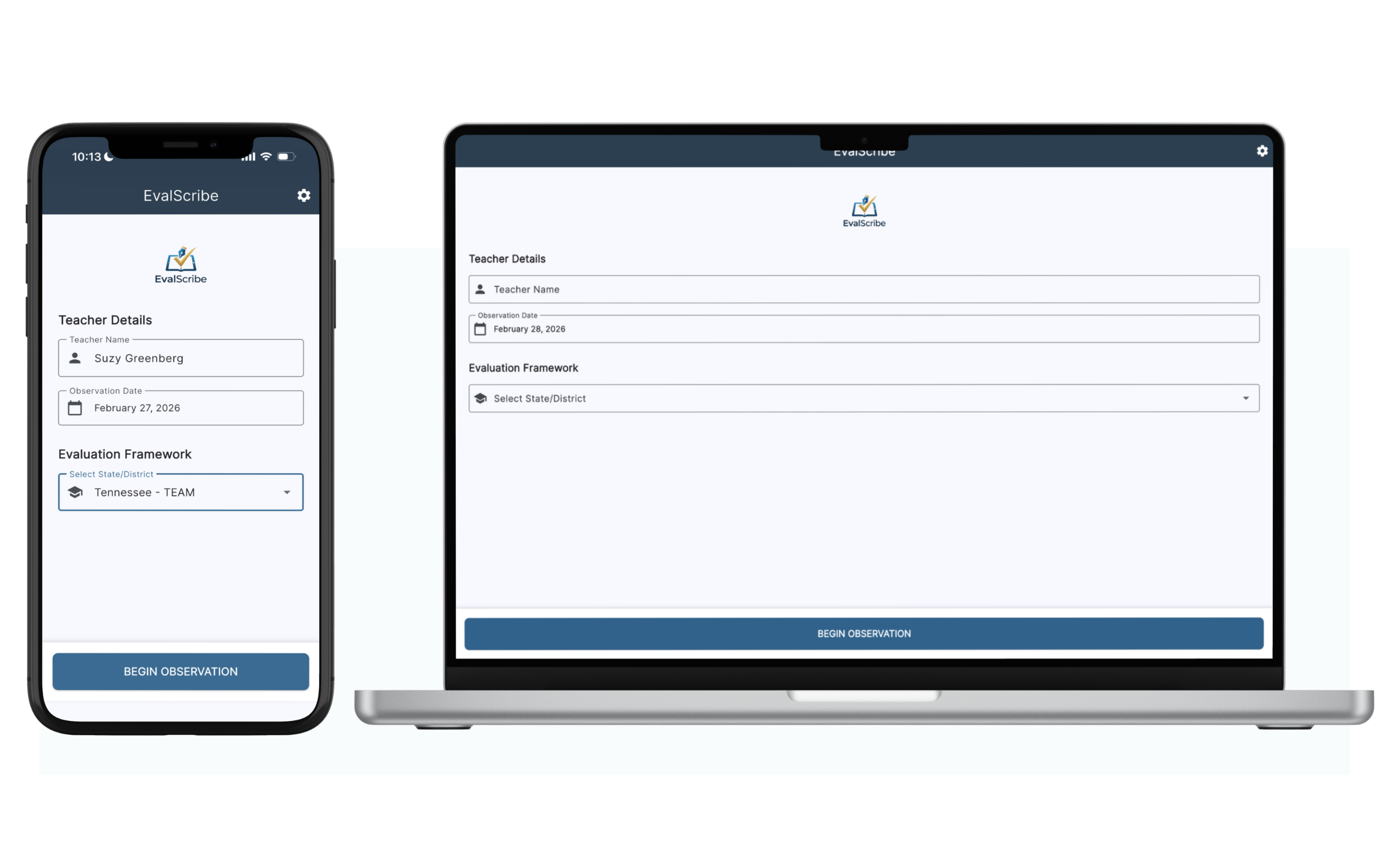
EvalScribe runs natively on iPhone, iPad, and Mac — work where you are.
Capture notes the way you already work.
No retraining required. Whatever your walkthrough style, EvalScribe accepts it.
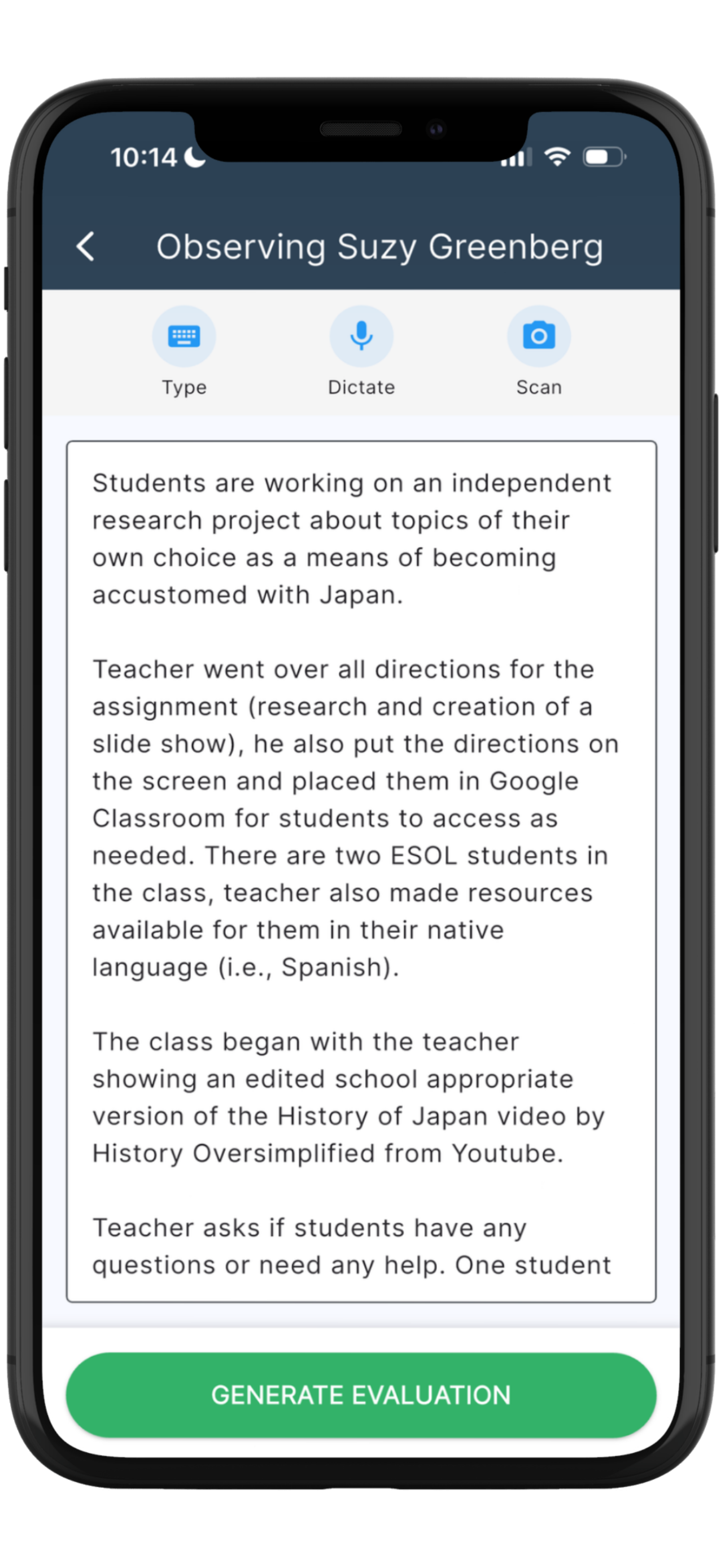
Snap a photo
Photograph your handwritten notes mid-walkthrough. Smart Scan OCR converts handwriting to text — even messy handwriting, even pedagogical terms.
Dictate as you go
Speak observations directly into the app. Voice dictation captures what you saw without breaking your eye contact with the classroom.
Type directly
Prefer to type? Enter notes straight into the app — they flow into the same drafting process as scans and dictation.
Why generic AI falls short for TEAM and Project COACH.
Pasting your walkthrough notes into a general-purpose chatbot might produce a paragraph that sounds polished — but for TEAM or COACH documentation, "sounds polished" isn't the bar. Defensible evaluations are.
| Capability | Generic AI (ChatGPT, Claude, etc.) | EvalScribe |
|---|---|---|
| Different frameworks | ✕Has no understanding that Tennessee districts use different frameworks. Treats every prompt the same. | ✓Works with districts that use TEAM or Project COACH, so your write-up follows the framework your district uses. |
| Organizing evidence | ✕Hallucinates indicator numbers and invents rubric language that doesn't exist in either framework. | ✓Organizes your evidence by TEAM indicators or Project COACH criteria so it is ready to hold up against your district's rubric. |
| Rubric scoring | ✕Inconsistent ratings between teachers — and between sessions on the same teacher. | ✓Suggests draft performance ratings for your review based on your captured evidence. You decide every rating. |
| Level distinctions | ✕Defaults to generic "good/great" framing that doesn't reflect the performance levels your framework uses. | ✓Drafts language organized around your framework's performance levels so you can check it against your district's rubric. Final ratings are yours. |
| Note input | ✕Requires you to retype everything before the AI can do anything with it. | ✓Accepts typed notes, dictation, or photos of handwritten notes via Smart Scan OCR. |
| Feedback language | ✕Vague, generic comments that could describe any teacher. | ✓Professional, evidence-anchored feedback you can align to your district's TEAM or COACH documentation. |
| Evaluator workflow | ✕No concept of walkthroughs, formal observations, or pre/post conferences. | ✓Built for evaluation write-ups and the administrator workflow around them, from capture to final exported PDF. |
| Data privacy | ✕Free tiers may use your inputs to train public models. | ✓Enterprise-grade Microsoft Azure. Transient processing. Zero retention. Never used for training. |
| Defensibility | ✕Output you can't trace back to evidence or rubric language. | ✓Every comment is tied to evidence pulled from your notes and the indicator or criterion it supports. |
How much Tennessee evaluation time could you reclaim?
Tune the inputs to your reality. The numbers update as you go.
You could reclaim approximately
hours per year
Workdays reclaimed
Total evaluations
Based on early EvalScribe users saving an average of 35 minutes per evaluation. Individual results may vary based on your current workflow.
The best way to see it
is to watch it.
Reading about how EvalScribe drafts a TEAM or Project COACH evaluation isn't the same as watching it happen. The demo walks through a real observation, from capture and organizing evidence to suggested ratings and final export.
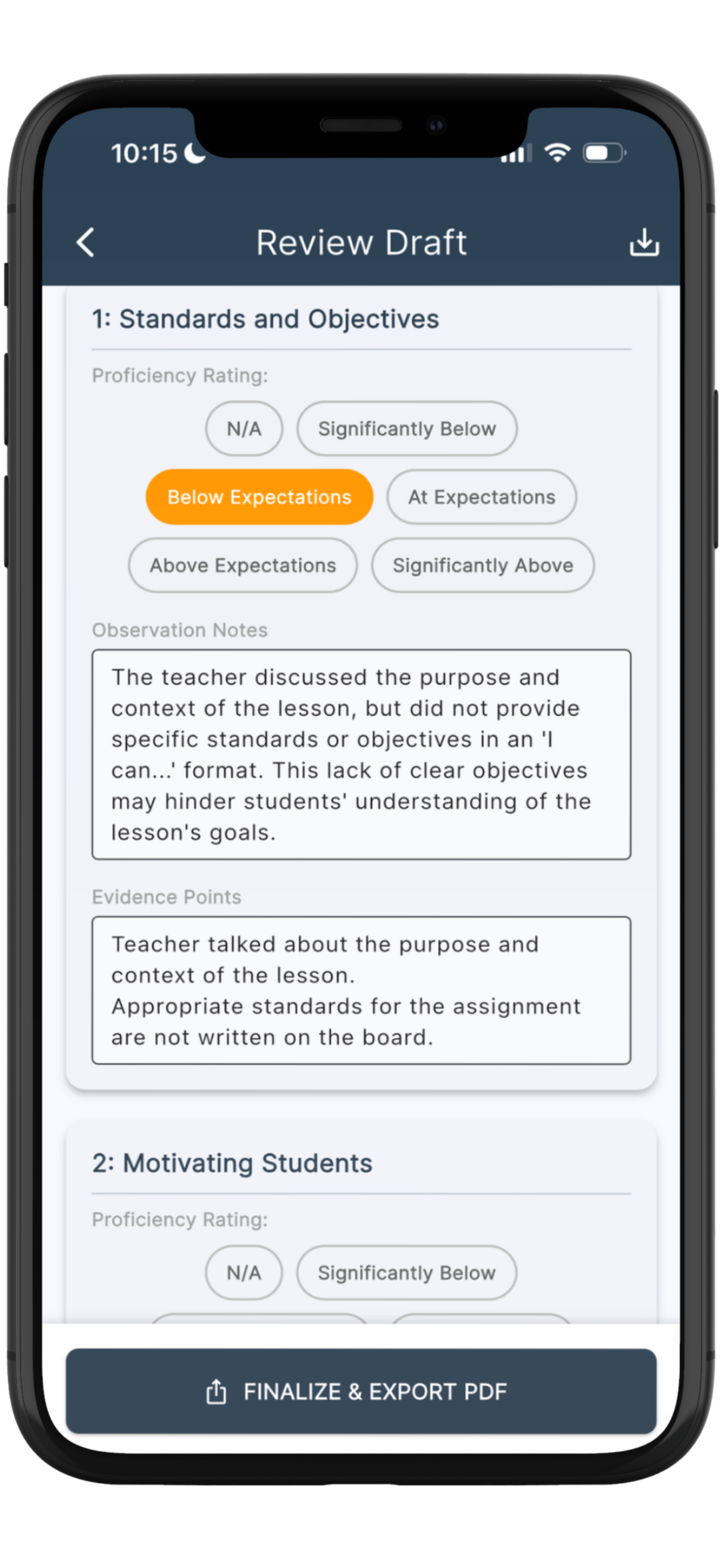
The draft review screen — every comment, rating, and piece of organized evidence is fully editable before export.
See an example EvalScribe report.
A real EvalScribe-generated evaluation, formatted exactly as it exports from the app. The workflow is the same across frameworks — useful to share with district stakeholders.
Download sample PDFWhat educational leaders are saying.
Real feedback from administrators across roles — from academic coaches to assistant superintendents.
EvalScribe is a tool that every public school principal should use. This resource literally makes multiple people out of administrators, allowing them to focus their energies on precise observation analysis and quality feedback while leaving EvalScribe to handle the mechanics. This tool will remove virtually all of the drudgery from the classroom evaluation process and would represent an excellent use of school funds.
Dr. Robert Stinson
Principal
After seeing a detailed demonstration of EvalScribe, I came away very impressed with both the concept and the execution. The platform provides administrators with a practical way to quickly capture classroom observations and generate high-quality, customized feedback that remains aligned to their evaluation framework and local expectations. What stood out most was the balance between efficiency and quality. EvalScribe has the potential to reduce administrative workload while helping school leaders provide more timely and meaningful feedback to teachers — a tool with considerable promise for schools and districts.
Glenn Brown
Director of Student Services
Game changer. Absolute game changer for school admin.
Tobin Davidson
Assistant Superintendent · 40+ years in education
This is amazing. I would pay lots of money for this. I’m serious — it’s crazy good. I look forward to using it on a regular basis next year.
Kittie Brown
Assistant Principal
Evaluators spend an inordinate amount of time recording and documenting evaluations. This app is easy to use, affordable, and incredibly efficient. It cuts the time spent recording and documenting evaluations down significantly and frees us up to handle other aspects of the job. Plus, the conference suggestions save on prep time when a conference is warranted.
Angie Brandt
Academic Coach
Built by educators, for educators.
EvalScribe was co-founded by a practicing classroom teacher and his wife — a husband-and-wife team with thirty years of combined classroom and business experience.

Anthony Neely, Ph.D.
Co-founder · Product
A tenured K–12 classroom teacher and Professional Learning Lead. District Teacher of the Year, with nearly 20 years in education and three published books.

Andrea Neely, Ph.D.
Co-founder · Business
Associate Professor of Management. Research and teaching in organizational management.
Your evaluation data stays yours.
Observation notes are processed transiently on Microsoft Azure and are not retained on our servers. Your evaluation records live locally on your device. Notes and evaluations are never used to train public AI models. For districts needing a Data Processing Agreement or FERPA attestation, those are available on request.
Simple, transparent pricing.
Try EvalScribe with three free evaluations. When you're ready to keep going, pick the plan that fits your role.
Individual
For a single evaluator on their own device.
Billed annually per user
- Unlimited evaluations
- Works with every state and national framework, including TEAM and Project COACH
- iOS & macOS access
- 3 free evaluations to start
School-wide
For a school with multiple evaluators.
3+ evaluators
- Everything in Individual
- 10% volume discount
- Unique access code issued to your school
- Easy distribution to your evaluators
District-wide
For districts deploying across every evaluator.
Best value for full deployments
- Everything in School-wide
- 20% volume discount
- Single access code for the entire district
- Direct support contact for rollout
All pricing shown is introductory and may change. For school and district plans, EvalScribe issues a unique access code that the buyer distributes to their evaluators.
Tennessee evaluation & EvalScribe — common questions.
Does EvalScribe support both TEAM and Project COACH?
Yes. EvalScribe works with Tennessee districts that use either TEAM or Project COACH. You evaluate against your district's framework. EvalScribe organizes your notes, suggests draft ratings for your review, and helps you write it up. For Project COACH districts, EvalScribe also supports the percentage-based summative score and the conversion to Tennessee's five-level state scale for TNCompass reporting.
Does EvalScribe support TEM or TIGER?
EvalScribe currently works with Tennessee districts that use TEAM or Project COACH. If your district uses TEM or TIGER, email [email protected] and tell us how you evaluate. We read every message.
Does EvalScribe replace evaluator judgment?
No. EvalScribe drafts evidence-organized evaluations and suggested performance-level ratings. The evaluator reviews, edits, and finalizes every document. The professional judgment is always yours — EvalScribe just removes the typing.
Does EvalScribe handle the full Tennessee evaluation, including TVAAS and student growth data?
No. EvalScribe addresses the observation component of the evaluation, which represents 50% of the final TEAM or COACH score. The remaining 50% — student growth data via TVAAS (35%) and a teacher-selected achievement measure (15%) — is handled outside the app, typically through TNCompass and other district systems.
Can the generated TEAM or COACH evaluations be edited?
Yes, fully. Every comment, every rating, and every piece of organized evidence inside a draft evaluation can be edited before you export the final PDF. You are always the last set of eyes on the document.
Does EvalScribe support walkthroughs as well as formal observations?
Yes. Brief walkthroughs and full formal observations both flow through the same capture-and-draft pipeline, so the documentation produced is consistent across observation types.
Is observation data stored?
Your notes are processed transiently on Microsoft Azure and are not retained on EvalScribe's servers. Your evaluation records sit locally on your device under a local-first architecture. Your data is never used to train public AI models. For more detail, see our Privacy Policy.
How is EvalScribe different from ChatGPT or Claude?
General-purpose AI tools aren't designed around how teacher evaluations are written. They can invent indicators that don't exist, score inconsistently, and produce vague comments. EvalScribe is built for evaluation write-ups and the administrator workflow around them, from capture through final export.
Is EvalScribe available for iOS and macOS?
Yes. Individual evaluators can download EvalScribe from the Apple App Store on both iOS and macOS, with a free trial that includes three evaluations.
Can schools or districts purchase licenses for multiple evaluators?
Yes. School-wide licensing starts at three or more evaluators ($90/user/year), and district-wide licensing is $80/admin/year. When you order, EvalScribe issues a unique access code that you distribute to your evaluators — no separate provisioning required. Email [email protected] to get started.
Which other state frameworks are supported?
EvalScribe supports evaluators in all 50 states and Washington D.C., including districts that use widely adopted models such as Danielson, Marzano, Stronge, CEL 5D+, NIET, and Kim Marshall. The complete list is available at evalscribe.com/frameworks.
Don't see your question? Reach out via our contact page — we read every message personally.
Spend less time on paperwork.
Lead your building.
EvalScribe was built to help Tennessee evaluators spend less time documenting evaluations and more time doing what matters: leading instruction, coaching teachers, and walking buildings.

Three evaluations free — no credit card · Available on iPhone, iPad, and Mac